Archive for the ‘Statistical programming’ Category.

Shading between curves in R

As a R learner programmer, it took me unconscionably long to work out how to use polygon to shade under and between curves, despite searches of the R manual and R-help – they just didn’t start far enough back. So, for anyone else scratching his or her head over polygon (and so I can find it again when I forget how it’s done), here are the series of steps I went through to figure it out.

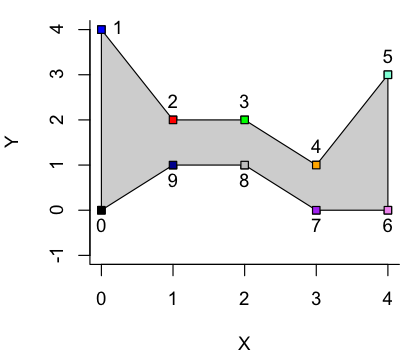
The function takes in an x vector and a y vector, defining a set of coordinates that, in order, taken in order trace around the area to be shaded. Thus for a set of points 1-10, defined individually as x.1, y.1 to x.10, y.10,

x <- c(x.1,x.2,x.3,x.4,x.5,x.6,x.7,x.8,x.9,x.10)
y <- c(y.1,y.2,y.3,y.4,y.5,y.6,y.7,y.8,x.9,y.10)

The area inside these points is shaded by

polygon(x,y,col=gray(0.8))

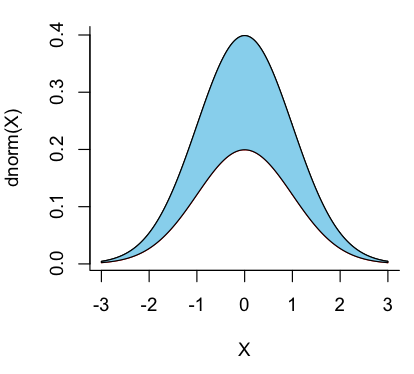
To apply this to two curves, both normal distributions between -3 and 3, one half the height of the other

x <- seq(-3,3,0.01)
y1 <- dnorm(x,0,1)
y2 <- 0.5*dnorm(x,0,1)
plot(x,y1,type="l",bty="L",xlab="X",ylab="dnorm(X)")
points(x,y2,type="l",col="red")
polygon(c(x,rev(x)),c(y2,rev(y1)),col="skyblue")

The first half of the x-vector in the polygon is just the values of x itself, corresponding to the part of the polygon that is tracing out the upper curve along increasing values of x. The second part for of the x-vector in the polygon is the reverse of x, corresponding to the part of the polygon that is tracing out the lower curve along decreasing values of x. The first part of the y-vector is the y values of the upper curve, and the second part of the y-vector is the y values of the lower part of the curve.

That shaded the area between the curves along the full plotted range.

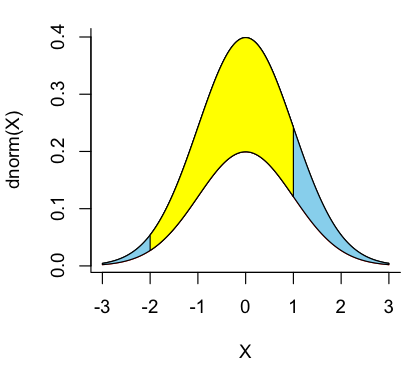
To shade only a defined portion, say the area from x=-2 to x=1.

x <- seq(-3,3,0.01)
y1 <- dnorm(x,0,1)
y2 <- 0.5*dnorm(x,0,1)
x.shade <- seq(-2,1,0.01)
polygon(c(x.shade,rev(x.shade)),c(dnorm(x.shade,0,1),0.5*dnorm(rev(x.shade),0,1)),col="yellow")

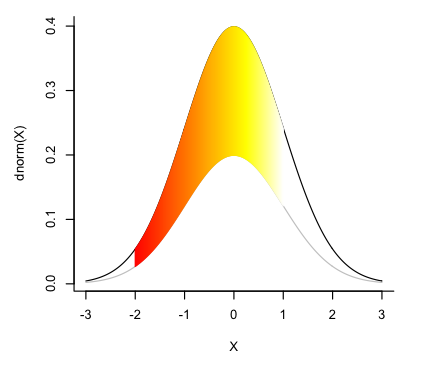
To shade the same defined portion as a gradient, from red to yellow (from the built-in heat.colors palette):

x <- seq(-3,3,0.01)
y1 <- dnorm(x,0,1)
y2 <- 0.5*dnorm(x,0,1)
x.shade <- seq(-2,1,0.01)
par(oma=c(1,1,1,1),cex=0.7)
plot(x,y1,type="l",bty="L",xlab="X",ylab="dnorm(X)")
points(x,y2,type="l",col="gray")
l <- length(x.shade)
color <- heat.colors(l)
for (i in 1:l)
{
polygon(c(x.shade[i],rev(x.shade[i])),c(dnorm(x.shade[i],0,1),
0.5*dnorm(rev(x.shade[i]),0,1)),border=color[i],col=NA)
}

This draws a succession of individual polygons between the curves, adjusting the color along the gradient as it goes. (Note that the loop above is for i in one to letter-L).

A few of my favourite tools: Wine

Wine (named in recursive fashion “Wine is not an emulator”) is used to run Windows applications on Linux; essentially, it interprets Windows commands for Linux and vice versa. I first met Wine in the form of Darwine (the “Dar” being for the underlying Darwin windowing technology in OSX), ported and maintained by Mike Kroneberg, and described at Low End Mac in an article by Alan Zisman. An alternative approach to installing wine, which I have not explored, is to install Wine via MacPorts.

The utility of Wine is that it does not require one to partition the hard drive, reboot, or to own and run any version of Windows. I have a full installation of Windows Vista Pro running on Parallels, but for certain lightweight, self-contained programs, I can launch Darwine and be running in a quarter of the time it takes for Parallels and then Vista to lumber into motion. WinBUGS, which I’ve been learning for Bayesian analysis, runs quite happily on Darwine, although I had to install by downloading and unpacking a zip file (per instructions for Vista or 64 bit systems), as the installer itself gave an error. After that, about the only tricky part was figuring out the file structure of the pseudo-C drive and how to access the files on the Mac, since they’re in an invisible folder. FirstBayes (Bayesian learning software) did not run, even after I figured out how to do the required registry hack, but then FirstBayes didn’t care much for Vista, either. Notepad++ runs without any trouble, as does Plant Studio (an old Windows program for building 3D plant models). Here is the official application database, rather games-heavy.

Darwine is no longer being developed, but its successor, now named Wine, is still in development. As my copy of Darwine survived beyond the Snow Leopard Event Horizon and still does what I need it to do, I will upgrade later.